
# Git
git config --global --unset http.proxy
git config --global --unset https.proxy
# 基础
# 1.设置用户签名
第一次使用时要操作,要不提交会出问题
git config --global user.name <username>
git config --global user.email <email>
1
2
2
Ronin / yuhaochen37@outlook.com
# 2.初始化本地库
创建文件夹,在对应路径下使用git bash
git init
1
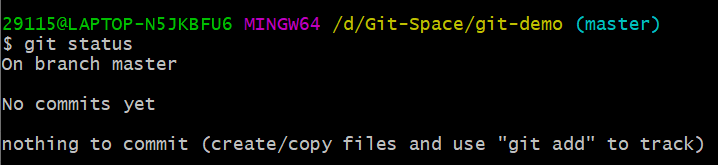
# 3.查看本地库状态
git status
1
# 4.添加到暂存区
git add <file>
1
Tips:
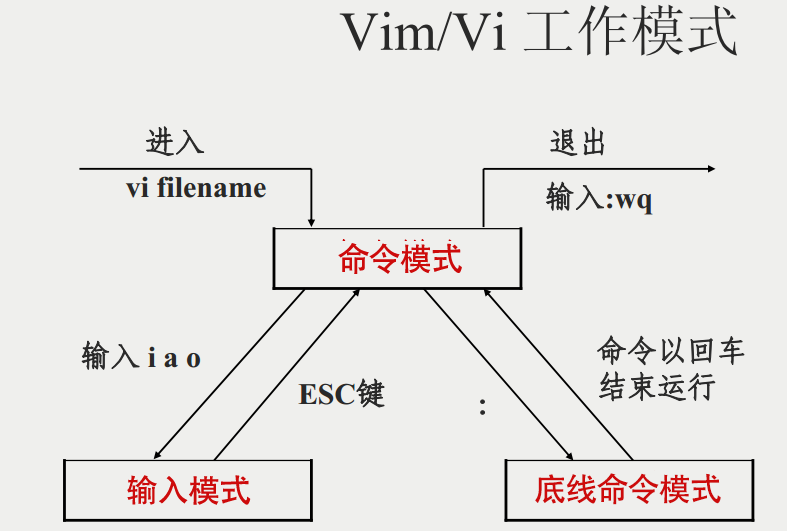
1.git bash里通用linux命令
2.
# 5.提交本地库
git commit -m 备注 <file>
1
# 6.查看版本信息
git reflog
git log //详细
1
2
2
# 7.状态改变情况
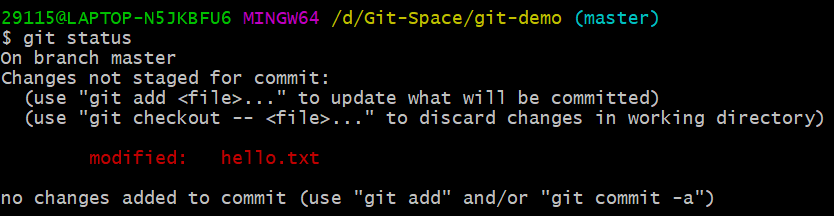
1.commit之后,修改文件,然后查看状态
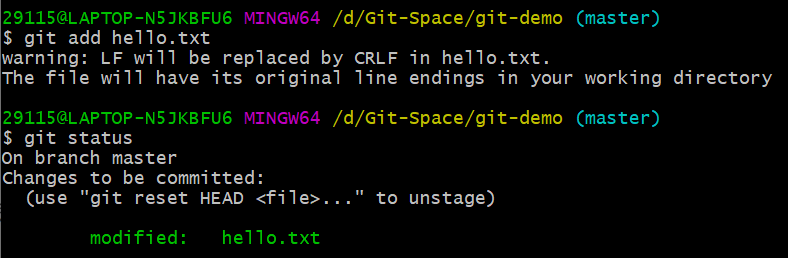
2.然后添加到暂存区,再查看状态
3.然后commit,再查看状态

4.看日志

# 8.版本穿梭
git reset --hard <版本号>
1
# 分支操作
# 1.查看分支
git branch -v
1
# 2.创建分支
git branch <分支名>
1
# 3.切换分支
git checkout <分支名>
1
# 4.合并分支
把指定的分支合并到当前分支
git merge <分支名>
1
冲突产生的原因: 修改的不是同一个地方,而是同个地方两个分支的该文件不一样,合并的时候要进行人为的取舍
# 常见操作组合
pull project from github
git init
git pull <Repo HTTPS>
1
2
2
new a branch
git checkout -b <branch-name>
1
commit your code
git add .
git commit -m "<what you do>"
git push origin <branch-name>
1
2
3
2
3
go to merge, and then:
git checkout dev
git pull
1
2
2
